Help Guides
Surveys
Getting Responses
Managing Responses
Triage Rules allow you to automatically set the status of incoming feedback based on:
- AI-applied labels
- Score and comment sentiment
This helps your team focus attention where it’s needed, without manually reviewing every response.
Triage Rules can reduce repetitive admin.
If you’re new to feedback status, read: Manage feedback status: Open, Action Required and Closed.
How Triage Rules work
Every new piece of feedback passes through your Triage Rules in order.
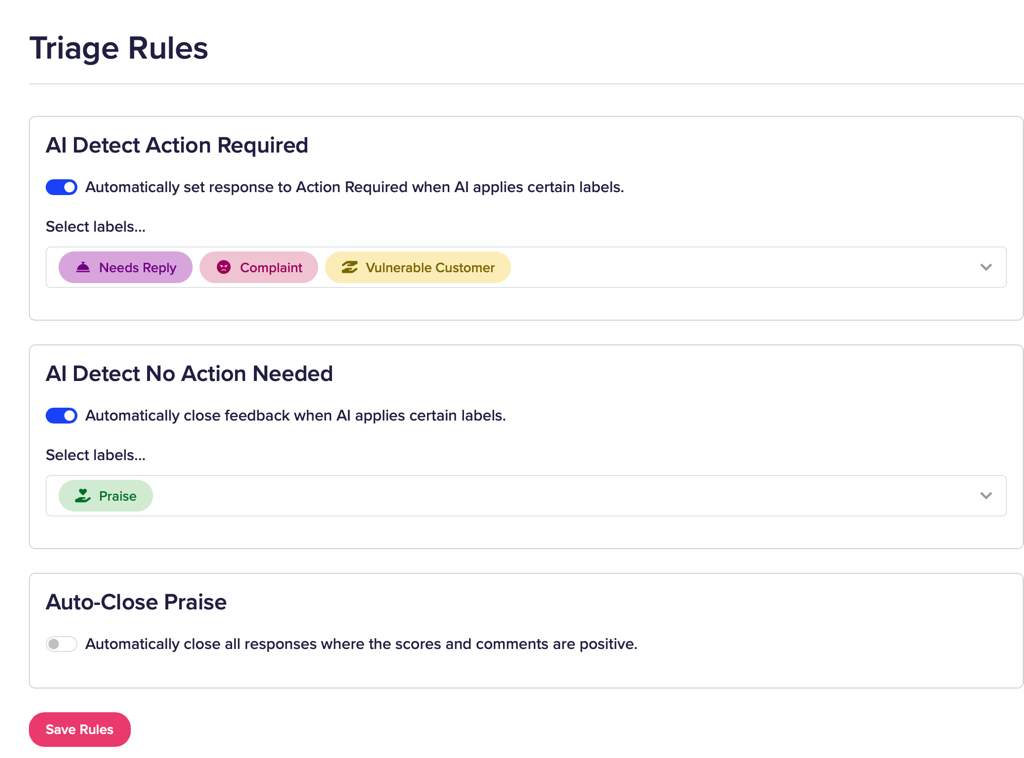
The rules run in this sequence:
- Label-based escalate to Action Required
- Label-based auto-close
- Auto-close praise
As soon as a rule matches, processing stops.
If no rule matches, the feedback remains Open.
Only one rule will ever apply to a single item of feedback.
The three available rules
You can enable or disable each rule independently.
1. AI Detect Action Required
Automatically sets feedback to Action Required when AI applies selected labels.
Use this when certain labels always require follow-up.
Examples:
- Needs Reply
- Complaint
- Vulnerable Customer
- Refund Recommended
When AI applies one of your selected labels, the feedback is immediately escalated.
This rule runs first, so escalation always takes priority over closing.
2. AI Detect No Action Needed
Automatically sets feedback to Closed when AI applies selected labels.
Use this when certain labels clearly indicate no follow-up is required.
Examples:
- Praise
- Blog mention
- General comment
If one of these labels is applied (and the feedback has not already matched the Action Required rule), the feedback will be closed automatically.
3. Auto-Close Praise
Automatically closes feedback where:
- All rating scores are positive, and
- Comments are positive
This is a sentiment-based rule, not label-based.
It runs last, meaning it will not override any earlier rule.
For example:
- If a response is fully positive but also labelled Needs Reply, it will be set to Action Required, not closed.
Why the order matters
Because rules stop once one matches, the order ensures:
- Escalation always wins
- Explicit label logic overrides general sentiment logic
- Clearly positive feedback can be closed safely
Example:
A comment is highly positive, but AI applies the label Needs Reply.
Result:
- Rule 1 matches (escalate)
- Rules 2 and 3 do not run
- Feedback is set to Action Required
This prevents important follow-up being accidentally closed.
When to use Triage Rules
Triage Rules are helpful when:
- You receive high volumes of feedback
- Most feedback does not require action
- You want your team focused on at-risk customers
They are not a substitute for:
- Reviewing serious complaints
- Safeguarding procedures
- Complex case management
If you’re unsure how labels behave in your account, review:
Summary
Triage Rules allow you to:
- Escalate important feedback automatically
- Close clearly positive feedback
- Reduce manual review
- Protect follow-up processes
Rules run in order, stop after the first match, and leave unmatched feedback as Open.
If you’d like help reviewing your label setup before enabling automation, please get in touch.