Help Guides
Surveys
Reporting
Getting Responses
Managing Responses
Integrations
Triage Rules let you automatically handle incoming feedback based on:
- AI-applied labels
- Score and comment sentiment
This helps your team focus attention where it’s needed, without manually reviewing every response.
If you’re new to feedback status, read: Manage feedback status: Unreviewed, Assigned and Closed.
How Triage Rules work
Every new piece of feedback passes through your Triage Rules in order. Administrators can configure them under Company Settings → Triage Rules.
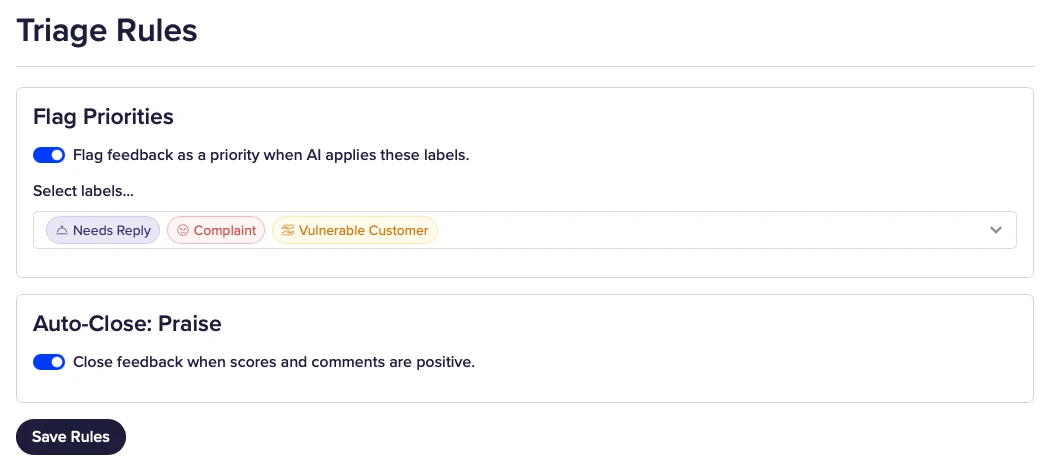
The rules run in this sequence:
- Flag Priorities (from selected AI labels)
- Auto-Close: Praise (positive scores and comments)
As soon as a priority rule matches, that feedback is flagged as a priority. Auto-close praise will not close an item that has already been flagged as a priority.
If no rule matches, the feedback stays Unreviewed for your team to pick up in Inbox.
Rules are designed so escalation (priority) always wins over closing.
The available rules
You can enable or disable each rule independently, then click Save Rules. Flag Priorities requires AI features to be enabled on your account.
1. Flag Priorities
Automatically flags feedback as a Priority when AI applies selected labels.
Use this when certain labels always deserve early attention.
Examples:
- Needs Reply
- Complaint
- Vulnerable Customer
- Refund Recommended
When AI applies one of your selected labels, the feedback is prioritised immediately. It remains Unreviewed until someone assigns an owner.
This runs before auto-close, so important items are never closed as praise by mistake.
For more on using priority day to day, see Flag as priority.
2. Auto-Close: Praise
Automatically closes feedback where:
- There is at least one rating, and all rating scores are positive
- Any comments left by the customer are positive
A response does not need a comment to qualify for auto-close.
This is a sentiment-based rule, not label-based.
It runs after priority flagging, so it will not close feedback that matched a priority label.
Closed items get the outcome No action needed, with a timeline entry explaining that ratings and text sentiment were positive.
Why the order matters
Because priority is checked before auto-close:
- Priority always wins
- Explicit label logic overrides general “looks positive” logic
- Clearly positive, non-priority feedback can be closed safely
Example:
A comment is highly positive, but AI also applies the label Needs Reply (configured as a priority label).
Result:
- Priority rule matches
- Auto-close does not close the item
- Feedback is flagged Priority and left Unreviewed for someone to assign
When to use Triage Rules
Triage Rules are helpful when:
- You receive high volumes of feedback
- Most feedback does not require action
- You want urgent themes surfaced quickly via priority
They are not a substitute for:
- Reviewing serious complaints
- Safeguarding procedures
- Complex case management
If you’re unsure how labels behave in your account, review:
Summary
Triage Rules allow you to:
- Flag important feedback automatically
- Close clearly positive feedback
- Reduce manual review
- Protect follow-up processes
Rules run in order, and priority flagging prevents praise auto-close from hiding work that needs attention.
If you’d like help reviewing your label setup before enabling automation, please get in touch.